Calculates the length of the hypotenuse of a right-angled triangle given the lengths of the other two sides.This method computes z = Sqrt(Pow(x, 2) + Pow(y, 2)) by avoiding underflow and overflow.
fun: The function that represents the implicit ODE. The function should accept three doubles (time, state, and its derivative) and return a double representing the derivative of the state.
t0: An array of time points at which the solution is desired. The first element is the initial time, and the last element is the final time.
y0: The initial value of the dependent variable (state).
ytruth: An array of intergers indicating which component of y0 is fixed and which is not.
yp0: The initial time derivative of the dependent variable (state).
yptruth: An array of intergers indicating which component yp0 is fixed and which is not.
options: Optional parameters for the ODE solver, such as relative tolerance, absolute tolerance, and maximum step size. If not provided, default options will be used.
Returns:
A tuple containing two elements:
double y0: modified initial state.
double yp0: modified initial rate of change.
Remark:
decic changes as few components of the guess as possible. You can specify that certain components are to be held fixed by setting ytruth(i) = 1 if no change is permitted
in the guess for Y0(i) and 0 otherwise.An empty array for yptruth is interpreted as allowing changes in all entries.yptruth is handled similarly.
You cannot fix more than length(Y0) components.Depending on the problem, it may not be possible to fix this many.It also may not be possible to fix certain components of Y0 or YP0.
It is recommended that you fix no more components than necessary.
Example:
Determine the consistent initial condition for the implicit ODE \(~ty^2y'^3 - y^3y'^2 + t(t^2 + 1)y' - t^2y = 0~\) with initial condition \(~y(0) = \sqrt{1.5}~\).
// import librariesusingSystem;usingSepalSolver.Math;//define ODEstaticdoublefun(doublet,doubley,doubleyp)=>t*y*y*yp*yp*yp-y*y*y*yp*yp+t*(t*t+1)*yp-t*t*y;varopts=Odeset(Stats:true);doublet0=1,y0=Sqrt(t0*t0+1/2.0),yp0=0;(y0,yp0)=decic(fun,t0,y0,1,yp0,0);// print result to consoleConsole.WriteLine($"y0 = {y0}");Console.WriteLine($"yp0 = {yp0}");
Output:
y0 = 1.2247
yp0 = 0.8165
cref=System.ArgumentNullException is Thrown when the dydx is null.
cref=System.ArgumentException is Thrown when the tspan array has less than two elements.
Solves non stiff ordinary differential equations (ODE) using the Bogacki-Shampine method (Ode23).
Param:
dydx: The function that represents the ODE. The function should accept two doubles (time and state) and return a double representing the derivative of the state.
initcon: The initial value of the dependent variable (state).
tspan: An array of time points at which the solution is desired. The first element is the initial time, and the last element is the final time.
options: Optional parameters for the ODE solver, such as relative tolerance, absolute tolerance, and maximum step size. If not provided, default options will be used.
Returns:
A tuple containing two elements:
ColVec T: A column vector of time points at which the solution was computed.
Matrix Y: A matrix where each row corresponds to the state of the system at the corresponding time point in T.
Remark:
This method uses the Bogacki-Shampine method (Ode23) to solve the ODE. It is an adaptive step size method that adjusts the step size to achieve the desired accuracy.
For best results, the function should be smooth within the integration interval.
Example:
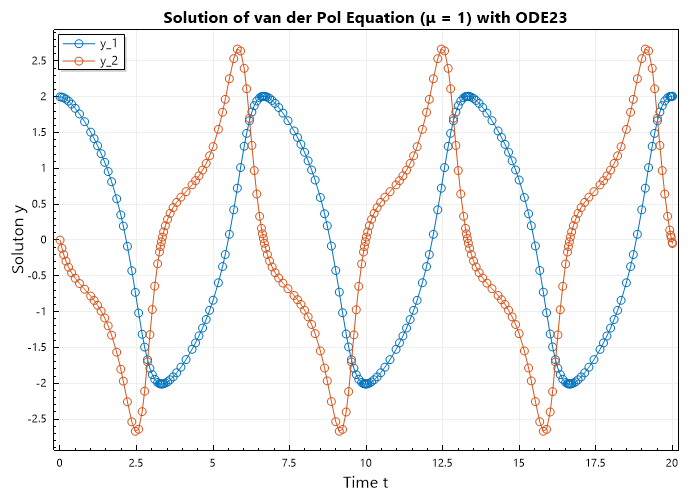
Solve the ODE \(~d^2y/dt^2 = (1 - y^2)y' - y~\) with initial condition \(~y(0) = [2, 0]~\) over the interval \([0, 2]\).
First we have to convert this to a system of first order differential equations,
\[\begin{split}\begin{array}{rcl}
y' &=& v \\
v' &=& (1 - y^2)v - y
\end{array}\end{split}\]
// import librariesusingSystem;usingSepalSolver.Math;//define ODEstaticColVecvdp1(doublet,ColVecy){double[]dy;returndy=[y[1],(1-y[0]*y[0])*y[1]-y[0]];}//Solve ODE(ColVecT,MatrixY)=Ode23(vdp1,[2,0],[0,20]);// Plot the resultPlot(T,Y,"-o");Xlabel("Time t");Ylabel("Soluton y");Legend(["y_1","y_2"],Alignment.UpperLeft);Title("Solution of van der Pol Equation (μ = 1) with ODE23");SaveAs("Van-der-Pol-(μ=1)-Ode23.png");
Output:
cref=System.ArgumentNullException is Thrown when the dydx is null.
cref=System.ArgumentException is Thrown when the tspan array has less than two elements.
Solves non stiff ordinary differential equations (ODE) using the Dormand-Prince method (Ode45).
Param:
dydx: The function that represents the ODE. The function should accept two doubles (time and state) and return a double representing the derivative of the state.
initcon: The initial value of the dependent variable (state).
tspan: An array of time points at which the solution is desired. The first element is the initial time, and the last element is the final time.
options: Optional parameters for the ODE solver, such as relative tolerance, absolute tolerance, and maximum step size. If not provided, default options will be used.
Returns:
A tuple containing two elements:
ColVec T: A column vector of time points at which the solution was computed.
Matrix Y: A matrix where each row corresponds to the state of the system at the corresponding time point in T.
Remark:
This method uses the Dormand-Prince method (Ode45) to solve the ODE. It is an adaptive step size method that adjusts the step size to achieve the desired accuracy.
For best results, the function should be smooth within the integration interval.
Example:
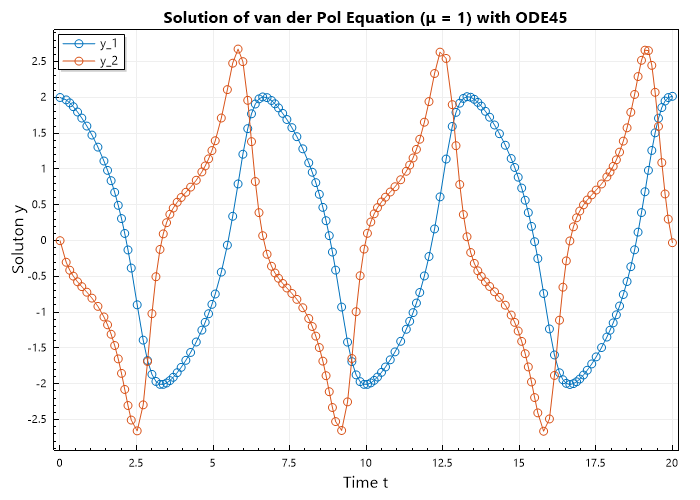
Solve the ODE \(~d^2y/dt^2 = (1 - y^2)y' - y~\) with initial condition \(~y(0) = [2, 0]~\) over the interval \([0, 2]\).
First we have to convert this to a system of first order differential equations,
\[\begin{split}\begin{array}{rcl}
y' &=& v \\
v' &=& (1 - y^2)v - y
\end{array}\end{split}\]
// import librariesusingSystem;usingSepalSolver.Math;//define ODEstaticColVecvdp1(doublet,ColVecy){double[]dy;returndy=[y[1],(1-y[0]*y[0])*y[1]-y[0]];}//Solve ODE(ColVecT,MatrixY)=Ode45(vdp1,[2,0],[0,20]);// Plot the resultPlot(T,Y,"-o");Xlabel("Time t");Ylabel("Soluton y");Legend(["y_1","y_2"],Alignment.UpperLeft);Title("Solution of van der Pol Equation (μ = 1) with ODE45");SaveAs("Van-der-Pol-(μ=1)-Ode45.png");
Output:
cref=System.ArgumentNullException is Thrown when the dydx is null.
cref=System.ArgumentException is Thrown when the tspan array has less than two elements.
Solves non stiff ordinary differential equations (ODE) using the Jim Verner 5th and 6th order pair method (Ode56).
Param:
dydx: The function that represents the ODE. The function should accept two doubles (time and state) and return a double representing the derivative of the state.
initcon: The initial value of the dependent variable (state).
tspan: An array of time points at which the solution is desired. The first element is the initial time, and the last element is the final time.
options: Optional parameters for the ODE solver, such as relative tolerance, absolute tolerance, and maximum step size. If not provided, default options will be used.
Returns:
A tuple containing two elements:
ColVec T: A column vector of time points at which the solution was computed.
Matrix Y: A matrix where each row corresponds to the state of the system at the corresponding time point in T.
Remark:
This method uses the Jim Verner 5th and 6th order pair method (Ode56) to solve the ODE. It is an adaptive step size method that adjusts the step size to achieve the desired accuracy.
For best results, the function should be smooth within the integration interval.
Example:
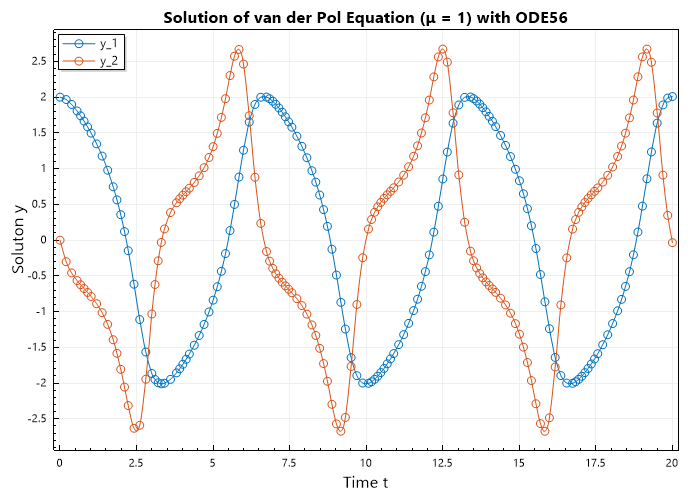
Solve the ODE \(~d^2y/dt^2 = (1 - y^2)y' - y~\) with initial condition \(~y(0) = [2, 0]~\) over the interval \([0, 20]\).
First we have to convert this to a system of first order differential equations,
\[\begin{split}\begin{array}{rcl}
y' &=& v \\
v' &=& (1 - y^2)v - y
\end{array}\end{split}\]
// import librariesusingSystem;usingSepalSolver.Math;//define ODEstaticColVecvdp1(doublet,ColVecy){double[]dy;returndy=[y[1],(1-y[0]*y[0])*y[1]-y[0]];}//Solve ODE(ColVecT,MatrixY)=Ode56(vdp1,[2,0],[0,20]);// Plot the resultPlot(T,Y,"-o");Xlabel("Time t");Ylabel("Soluton y");Legend(["y_1","y_2"],Alignment.UpperLeft);Title("Solution of van der Pol Equation (μ = 1) with ODE56");SaveAs("Van-der-Pol-(μ=1)-Ode56.png");
Output:
cref=System.ArgumentNullException is Thrown when the dydx is null.
cref=System.ArgumentException is Thrown when the tspan array has less than two elements.
Solves non stiff ordinary differential equations (ODE) using the Jim Verner 7th and 8th order pair method (Ode78).
Param:
dydx: The function that represents the ODE. The function should accept two doubles (time and state) and return a double representing the derivative of the state.
initcon: The initial value of the dependent variable (state).
tspan: An array of time points at which the solution is desired. The first element is the initial time, and the last element is the final time.
options: Optional parameters for the ODE solver, such as relative tolerance, absolute tolerance, and maximum step size. If not provided, default options will be used.
Returns:
A tuple containing two elements:
ColVec T: A column vector of time points at which the solution was computed.
Matrix Y: A matrix where each row corresponds to the state of the system at the corresponding time point in T.
Remark:
This method uses the Jim Verner 7th and 8th order pair method (Ode78) to solve the ODE. It is an adaptive step size method that adjusts the step size to achieve the desired accuracy.
For best results, the function should be smooth within the integration interval.
Example:
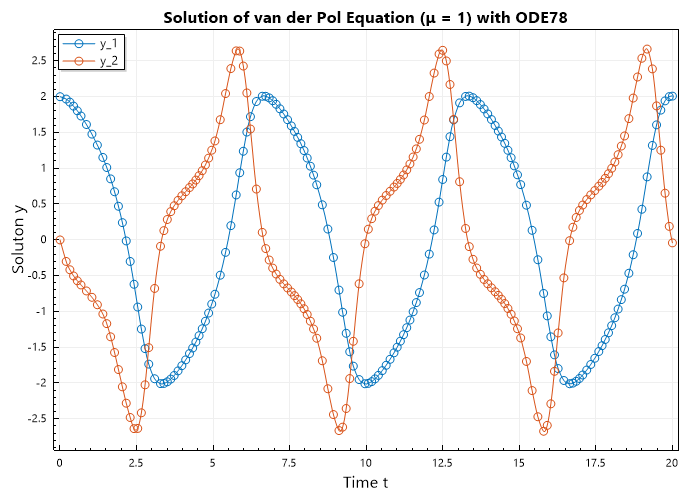
Solve the ODE \(~d^2y/dt^2 = (1 - y^2)y' - y~\) with initial condition \(~y(0) = [2, 0]~\) over the interval \([0, 20]\).
First we have to convert this to a system of first order differential equations,
\[\begin{split}\begin{array}{rcl}
y' &=& v \\
v' &=& (1 - y^2)v - y
\end{array}\end{split}\]
// import librariesusingSystem;usingSepalSolver.Math;//define ODEstaticColVecvdp1(doublet,ColVecy){double[]dy;returndy=[y[1],(1-y[0]*y[0])*y[1]-y[0]];}//Solve ODE(ColVecT,MatrixY)=Ode78(vdp1,[2,0],[0,20]);// Plot the resultPlot(T,Y,"-o");Xlabel("Time t");Ylabel("Soluton y");Legend(["y_1","y_2"],Alignment.UpperLeft);Title("Solution of van der Pol Equation (μ = 1) with ODE78");SaveAs("Van-der-Pol-(μ=1)-Ode78.png");
Output:
cref=System.ArgumentNullException is Thrown when the dydx is null.
cref=System.ArgumentException is Thrown when the tspan array has less than two elements.
Solves non stiff ordinary differential equations (ODE) using the Jim Verner 8th and 9th order pair method (Ode89).
Param:
dydx: The function that represents the ODE. The function should accept two doubles (time and state) and return a double representing the derivative of the state.
initcon: The initial value of the dependent variable (state).
tspan: An array of time points at which the solution is desired. The first element is the initial time, and the last element is the final time.
options: Optional parameters for the ODE solver, such as relative tolerance, absolute tolerance, and maximum step size. If not provided, default options will be used.
Returns:
A tuple containing two elements:
ColVec T: A column vector of time points at which the solution was computed.
Matrix Y: A matrix where each row corresponds to the state of the system at the corresponding time point in T.
Remark:
This method uses the Jim Verner 8th and 9th order pair method (Ode89) to solve the ODE. It is an adaptive step size method that adjusts the step size to achieve the desired accuracy.
For best results, the function should be smooth within the integration interval.
Example:
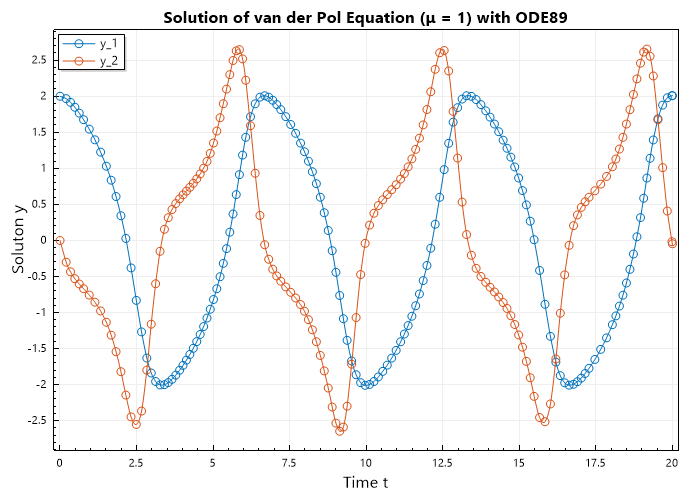
Solve the ODE \(~d^2y/dt^2 = (1 - y^2)y' - y~\) with initial condition \(~y(0) = [2, 0]~\) over the interval \([0, 20]\).
First we have to convert this to a system of first order differential equations,
\[\begin{split}\begin{array}{rcl}
y' &=& v \\
v' &=& (1 - y^2)v - y
\end{array}\end{split}\]
// import librariesusingSystem;usingSepalSolver.Math;//define ODEstaticColVecvdp1(doublet,ColVecy){double[]dy;returndy=[y[1],(1-y[0]*y[0])*y[1]-y[0]];}//Solve ODE(ColVecT,MatrixY)=Ode89(vdp1,[2,0],[0,20]);// Plot the resultPlot(T,Y,"-o");Xlabel("Time t");Ylabel("Soluton y");Legend(["y_1","y_2"],Alignment.UpperLeft);Title("Solution of van der Pol Equation (μ = 1) with ODE89");SaveAs("Van-der-Pol-(μ=1)-Ode89.png");
Output:
cref=System.ArgumentNullException is Thrown when the dydx is null.
cref=System.ArgumentException is Thrown when the tspan array has less than two elements.
Solves stiff ordinary differential equations (ODE) using Adaptive Diagonally Implicit RungeKutta of 4th and 5th Order Method (Ode45s).
Param:
dydx: The function that represents the ODE. The function should accept two doubles (time and state) and return a double representing the derivative of the state.
initcon: The initial value of the dependent variable (state).
tspan: An array of time points at which the solution is desired. The first element is the initial time, and the last element is the final time.
options: Optional parameters for the ODE solver, such as relative tolerance, absolute tolerance, and maximum step size. If not provided, default options will be used.
Returns:
A tuple containing two elements:
ColVec T: A column vector of time points at which the solution was computed.
Matrix Y: A matrix where each row corresponds to the state of the system at the corresponding time point in T.
Remark:
This method uses Adaptive Diagonally Implicit RungeKutta of 4th and 5th Order Method (Ode45s) to solve the ODE. It is an adaptive step size method that adjusts the step size to achieve the desired accuracy.
For best results, the function should be smooth within the integration interval.
Example:
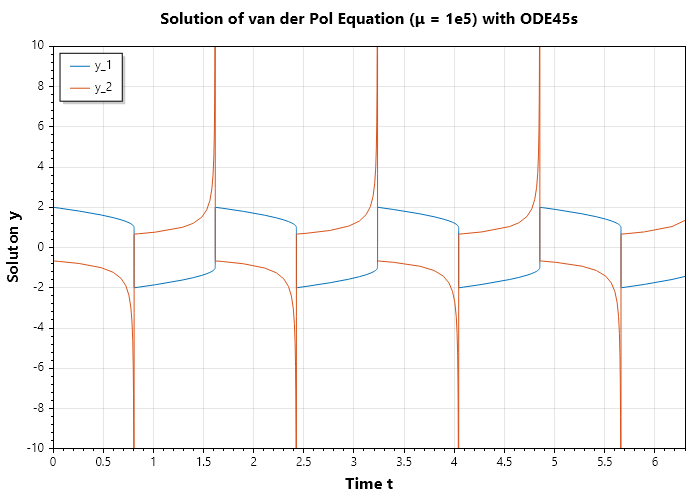
Solve the ODE \(~d^2y/dt^2 = 10^{5}((1 - y^2)y' - y)~\) with initial condition \(~y(0) = [2, 0]~\) over the interval \([0, 6.3]\).
First we have to convert this to a system of first order differential equations,
// import librariesusingSystem;usingSepalSolver.Math;//define ODEstaticColVecvdp2(doublet,ColVecy){double[]dy;returndy=[y[1],1e5*((1-y[0]*y[0])*y[1]-y[0])];}//Solve ODE(ColVecT,MatrixY)=Ode45s(vdp2,[2,0],[0,6.3]);// Plot the resultPlot(T,Y);Xlabel("Time t");Ylabel("Soluton y");Legend(["y_1","y_2"],Alignment.UpperLeft);Title("Solution of van der Pol Equation (μ = 1e5) with ODE45s");SaveAs("Van-der-Pol-(μ=1e5)-Ode45s");
Output:
cref=System.ArgumentNullException is Thrown when the dydx is null.
cref=System.ArgumentException is Thrown when the tspan array has less than two elements.
Solves inmplicit ordinary differential equations (ODE) using Adaptive Diagonally Implicit RungeKutta of 4th and 5th Order Method (Ode45i).
Param:
fun: The function that represents the implicit ODE. The function should accept three doubles (time, state, and its derivative) and return a double representing the derivative of the state.
initcon: A tuple containing two elements:
* double y0: initial state.
* double yp0: initial rate of change.
tspan: The initial value of the dependent variable (state).
options: Optional parameters for the ODE solver, such as relative tolerance, absolute tolerance, and maximum step size. If not provided, default options will be used.
Returns:
A tuple containing two elements:
ColVec T: A column vector of time points at which the solution was computed.
Matrix Y: A matrix where each row corresponds to the state of the system at the corresponding time point in T.
Remark:
This method uses Adaptive Diagonally Implicit RungeKutta of 4th and 5th Order Method (Ode45i) to solve the ODE. It is an adaptive step size method that adjusts the step size to achieve the desired accuracy.
For best results, the function should be smooth within the integration interval.
Example:
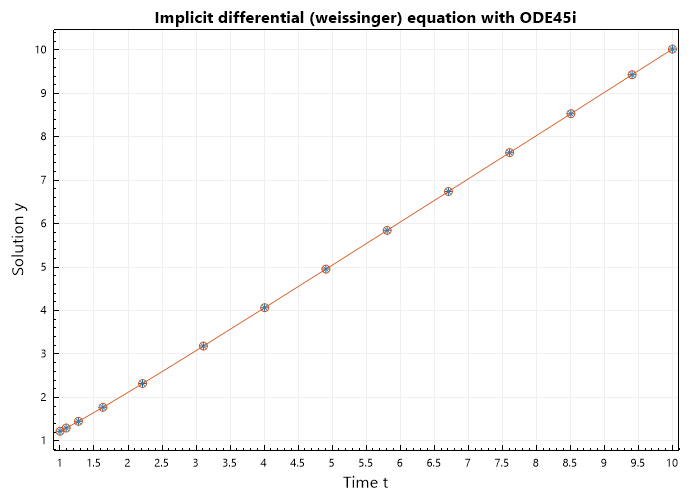
Solve the ODE \(~ty^2y'^3 - y^3y'^2 + t(t^2 + 1)y' - t^2y = 0~\) with initial condition \(~y(0) = \sqrt{1.5}~\).
Fits a polynomial of degree N to the data points specified by the arrays X and Y.
Mathematically, this can be represented as finding the coefficients of the polynomial:
\[P(x) = a_0 + a_1 x + a_2 x^2 + ... + a_N x^N\]
that best fits the given data points (X, Y).
Param:
X: The x-coordinates of the data points.
Y: The y-coordinates of the data points.
N: The degree of the polynomial to fit.
Returns:
An array containing the coefficients of the fitted polynomial, starting with the coefficient of the highest degree term.
Example:
\[X = [1, 2, 3, 4],~ Y = [1, 4, 9, 16],~ N = 2\]
In this example, we fit a polynomial of degree 2 to the data points.
The x-coordinates are represented by the array { 1, 2, 3, 4 } and the y-coordinates by { 1, 4, 9, 16 }.
// import librariesusingSystem;usingSepalSolver.Math;// Example of fitting a polynomialdouble[]X={1,2,3,4};double[]Y={1,4,9,16};intN=2;double[]coefficients=Polyfit(X,Y,N);// Print the resultConsole.WriteLine($"Coefficients: {string.Join(",", coefficients)}");
Coeffs: The coefficients of the polynomial, ordered from the highest degree to the constant term.
Returns:
An array of Complex numbers representing the roots of the polynomial.
Example:
\[P(x) = 2x^5 + 3x^4 + 5x^3 + 2x^2 + 7x + 4\]
In this example, we find the roots of the polynomial represented by the coefficients { 2, 3, 4, 2, 7, 4 }.
// import libraries
using System;
using SepalSolver;
using static SepalSolver.Math;

// Example of finding roots of a polynomial
double[] Coeffs = [2, 3, 4, 2, 7, 4];
Complex[] roots = Roots(Coeffs);
// Print the result
Console.WriteLine($"Roots:\n {string.Join("\n ", roots)}");
In this example, we find the roots of the polynomial with complex coefficients.
// import libraries
using System;
using SepalSolver;
using static SepalSolver.Math;

// Example of finding roots of a polynomial with complex coefficients
Complex[] Coeffs = [new(5, 2), new(3, 7), new(5, 8), new(3, 7), new(7, 4)];
Complex[] roots = Roots(Coeffs);

// Print the result
Console.WriteLine($"Roots:\n {string.Join("\n ", roots)}");
In this example, we perform polynomial deconvolution on two polynomials.
The dividend polynomial is represented by the coefficients { 1, 2, 3, 4, 5, 6 } and the divisor polynomial by { 1, 2, 3 }.
// import librariesusingSystem;usingSepalSolver.Math;// Example of performing polynomial deconvolutiondouble[]Polynomial=[1,2,3,4,5,6];double[]Divisor=[1,2,3];varresult=Deconv(Polynomial,Divisor);// Print the resultConsole.WriteLine($"Quotient: {string.Join(",", result.Quotient)}");Console.WriteLine($"Remainder: {string.Join(",", result.Remainder)}");
Polynomial: The coefficients of the first polynomial.
Multiplier: The coefficients of the second polynomial.
Returns:
An array containing the coefficients of the resulting polynomial.
Example:
\[P(x) = x^2 + 2x + 3,~ M(x) = x + 1\]
In this example, we perform polynomial convolution on two polynomials.
The first polynomial is represented by the coefficients \([1, 2, 3]\) and the second polynomial by \([1, 1]\).
// import librariesusingSystem;usingSepalSolver.Math;// Example of performing polynomial convolutiondouble[]Polynomial=[1,2,3];double[]Multiplier=[1,1];double[]Product=Conv(Polynomial,Multiplier);// Print the resultConsole.WriteLine($"Product: {string.Join(",", Product)}");
In this example, we perform polynomial convolution on two polynomials.
The first polynomial is represented by the coefficients \([2+3i, 5-i, 3+7i]\) and the second polynomial by \([-3+2i, 2-i]\).
// import librariesusingSystem;usingSepalSolver.Math;// Example of performing polynomial convolutionComplex[]Polynomial=[new(2,3),new(5,-1),new(3,7)];Complex[]Multiplier=[new(-3,2),new(2,-1)];varProduct=Conv(Polynomial,Multiplier);// Print the resultConsole.WriteLine($"Product: {string.Join(",", Product)}");
Computes the definite integral of a function using adaptive Gauss-LegendreP quadrature.
Param:
fun: The function to integrate. The function should accept a double and return a double.
x_1: The lower bound of the integration interval.
x_2: The upper bound of the integration interval.
eps: The desired relative accuracy. The default value is 1e-6.
Returns:
The approximate value of the definite integral.
Remark:
This method uses adaptive Gauss-LegendreP quadrature to approximate the definite integral.
The number of quadrature points is increased until the desired relative accuracy is achieved or a maximum number of iterations is reached.
For best results, the function should be smooth within the integration interval.
If x_1 equals x_2 then the method will return 0.
Example:
Integrate the function f(x) = x^2, which can be expressed as:
\[\int_{x_1}^{x_2} x^2 \, dx\]
// import librariesusingSystem;usingSepalSolver.Math;// Define the function to integrateFunc<double,double>f=(x)=>x*x;// Set the lower bound of xdoublex_1=0;// Set the upper bound of xdoublex_2=1;// Calculate the integraldoubleintegral=Integral(f,x_1,x_2);// Print the resultConsole.WriteLine($"The integral of x^2 is approximately: {integral}");
Output:
The integral of x^2 is approximately: 0.333333333321056
cref=System.ArgumentNullException is Thrown when the fun is null.
cref=System.Exception is Thrown when the maximum number of iterations is reached without achieving the desired accuracy.
Computes the definite double integral of a function over a region where both y-bounds are defined by functions of x, using adaptive Gauss-LegendreP quadrature.
Mathematically, this can be represented as:
fun: The function to integrate. The function should accept two doubles (x, y) and return a double.
x_1: The lower bound of the x integration.
x_2: The upper bound of the x integration.
y_1: A function that defines the lower bound of the y integration as a function of x. It should accept a double (x) and return a double (y).
y_2: A function that defines the upper bound of the y integration as a function of x. It should accept a double (x) and return a double (y).
eps: The desired relative accuracy. The default value is 1e-6.
Returns:
The approximate value of the definite double integral.
Remark:
This method uses adaptive Gauss-LegendreP quadrature to approximate the double integral.
The integration is performed over the region defined by x_1 <= x <= x_2 and y_1(x) <= y <= y_2(x).
The number of quadrature points is increased until the desired relative accuracy is achieved or a maximum number of iterations is reached.
For best results, the function should be smooth within the integration region, and both y_1(x) and y_2(x) should be smooth functions. Additionally, y_1(x) should be less than or equal to y_2(x) for all x in the interval [x_1, x_2] to ensure a valid integration region.
If x_1 equals x_2 then the method will return 0.
Example:
Integrate the function f(x, y) = x * y over the region where x ranges from 0 to 1, y ranges from x^2 to sqrt(x), which can be expressed as:
\[\int_{0}^{1} \int_{x^{2}}^{\sqrt{x}} x y \, dy \, dx\]
// import librariesusingSystem;usingSepalSolver.Math;// Define the function to integrateFunc<double,double,double>f=(x,y)=>x*y;// Define the lower bound of y as a function of xFunc<double,double>y_1=(x)=>x*x;// Define the upper bound of y as a function of xFunc<double,double>y_2=(x)=>Sqrt(x);// Set the lower bound of xdoublex_1=0;// Set the upper bound of xdoublex_2=1;// Calculate the integraldoubleintegral=Integral2(f,x_1,x_2,y_1,y_2);// Print the resultConsole.WriteLine($"The integral is approximately: {integral}");
Output:
The integral is approximately: 0.0833333333277262
..note::
If the any of the boundary of y is a constant, it can be defined as a lambda function that returns the constant value as shown below:
Example:
Integrate the function f(x, y) = x * y, which can be expressed as:
\[\int_{0}^{1} \int_{1}^{2} x y \, dy \, dx\]
// import librariesusingSystem;usingSepalSolver.Math;// Define the function to integrateFunc<double,double,double>f=(x,y)=>x*y;// Set the lower bound of xdoublex_1=0;// Set the upper bound of xdoublex_2=1;// Set the lower bound of yFunc<double,double>y_1=x=>1;// Set the upper bound of yFunc<double,double>y_2=x=>2;// Calculate the integraldoubleintegral=Integral2(f,x_1,x_2,y_1,y_2);// Print the resultConsole.WriteLine($"The integral of x*y is approximately: {integral}");
Output:
The integral of x*y is approximately: 0.749999999948747
Example:
Integrate the function f(x, y) = x * y over the region where x ranges from 0 to 1, and y ranges from x^2 to 2, which can be expressed as:
\[\int_{x_1}^{x_2} \int_{y_1(x)}^{y_2} x y \, dy \, dx\]
// import librariesusingSepalSolver;usingSystem;// Define the function to integrateFunc<double,double,double>f=(x,y)=>x*y;// Define the lower bound of y as a function of xFunc<double,double>y_1=(x)=>x*x;// Set the lower bound of xdoublex_1=0;// Set the upper bound of xdoublex_2=1;// Set the upper bound of ydoubley_2=2;// Calculate the integraldoubleintegral=Integrators.GaussLeg2(f,x_1,x_2,y_1,y_2);// Print the resultConsole.WriteLine($"The integral is approximately: {integral}");
Output:
The integral is approximately: 0.916666666604556
Example:
Integrate the function f(x, y) = x * y over the region where x ranges from 0 to 1, and y ranges from 1 to x^2, which can be expressed as:
\[\int_{x_1}^{x_2} \int_{y_1}^{y_2(x)} x y \, dy \, dx\]
// import librariesusingSepalSolver;usingSystem;// Define the function to integrateFunc<double,double,double>f=(x,y)=>x*y;// Define the upper bound of y as a function of xFunc<double,double>y_2=(x)=>x*x;// Set the lower bound of xdoublex_1=0;// Set the upper bound of xdoublex_2=1;// Set the lower bound of ydoubley_1=1;// Calculate the integraldoubleintegral=Integrators.GaussLeg2(f,x_1,x_2,y_1,y_2);// Print the resultConsole.WriteLine($"The integral is approximately: {integral}");
Output:
The integral is approximately: -0.166666666655809
Example:
Integrate the function f(x, y) = x * y over the region where x ranges from 0 to 1, y ranges from x^2 to sqrt(x), which can be expressed as:
\[\int_{x_1}^{x_2} \int_{y_1(x)}^{y_2(x)} x y \, dy \, dx\]
// import librariesusingSepalSolver;usingstaticSystem.MathusingSystem;// Define the function to integrateFunc<double,double,double>f=(x,y)=>x*y;// Define the lower bound of y as a function of xFunc<double,double>y_1=(x)=>x*x;// Define the upper bound of y as a function of xFunc<double,double>y_2=(x)=>Sqrt(x);// Set the lower bound of xdoublex_1=0;// Set the upper bound of xdoublex_2=1;// Calculate the integraldoubleintegral=Integrators.GaussLeg2(f,x_1,x_2,y_1,y_2);// Print the resultConsole.WriteLine($"The integral is approximately: {integral}");
Output:
The integral is approximately: 0.0833333333277262
cref=System.ArgumentNullException is Thrown when the fun is null.
cref=System.ArgumentNullException is Thrown when the y_1 is null.
cref=System.ArgumentNullException is Thrown when the y_2 is null.
cref=System.ArgumentException is Thrown when y_1(x) is greater than y_2(x) for any x in the interval [x_1, x_2].
Computes the definite triple integral of a function over a region where the y-bounds are defined by functions of x, and the z-bounds are defined by functions of x and y, using adaptive Gauss-LegendreP quadrature.
Mathematically, this can be represented as:
fun: The function to integrate. The function should accept three doubles (x, y, z) and return a double.
x_1: The lower bound of the x integration.
x_2: The upper bound of the x integration.
y_1: A function that defines the lower bound of the y integration as a function of x. It should accept a double (x) and return a double (y).
y_2: A function that defines the upper bound of the y integration as a function of x. It should accept a double (x) and return a double (y).
z_1: A function that defines the lower bound of the z integration as a function of x and y. It should accept two doubles (x, y) and return a double (z).
z_2: A function that defines the upper bound of the z integration as a function of x and y. It should accept two doubles (x, y) and return a double (z).
eps: The desired relative accuracy. The default value is 1e-6.
Returns:
The approximate value of the definite triple integral.
Remark:
This method uses adaptive Gauss-LegendreP quadrature to approximate the triple integral.
The integration is performed over the region defined by x_1 <= x <= x_2, y_1(x) <= y <= y_2(x), and z_1(x, y) <= z <= z_2(x, y).
The number of quadrature points is increased until the desired relative accuracy is achieved or a maximum number of iterations is reached.
For best results, the function should be smooth within the integration region, y_1(x), y_2(x), z_1(x, y), and z_2(x, y) should be smooth functions.
Ensure that y_1(x) <= y_2(x) and z_1(x, y) <= z_2(x, y) throughout the integration region.
If x_1 equals x_2 then the method will return 0.
Example:
Integrate the function f(x, y, z) = x * y * z over the region where x ranges from 0 to 1, y ranges from 1 to 2, and z ranges from 2 to 3, which can be expressed as:
\[\int_{x_1}^{x_2} \int_{y_1}^{y_2} \int_{z_1}^{z_2} x y z \, dz \, dy \, dx\]
// import librariesusingSepalSolver;usingSystem;// Define the function to integrateFunc<double,double,double,double>f=(x,y,z)=>x*y*z;// Set the lower bound of xdoublex_1=0;// Set the upper bound of xdoublex_2=1;// Set the lower bound of ydoubley_1=1;// Set the upper bound of ydoubley_2=2;// Set the lower bound of zdoublez1=2;// Set the upper bound of zdoublez2=3;// Calculate the integraldoubleintegral=Integral3(f,x_1,x_2,y_1,y_2,z1,z2);// Print the resultConsole.WriteLine($"The triple integral of x*y*z is approximately: {integral}");
Output:
The triple integral of x*y*z is approximately: 1.8749999998078
<example>
Integrate the function f(x, y, z) = x * y * z over the region where x ranges from 0 to 1, y ranges from x^2 to sqrt(x), and z ranges from 2 to 3, which can be expressed as:
\[\int_{x_1}^{x_2} \int_{y_1(x)}^{y_2(x)} \int_{z_1}^{z_2} x y z \, dz \, dy \, dx\]
// import librariesusingSepalSolver;usingstaticSystem.MathusingSystem;// Define the function to integrateFunc<double,double,double,double>f=(x,y,z)=>x*y*z;// Define the lower bound of y as a function of xFunc<double,double>y_1=(x)=>x*x;// Define the upper bound of y as a function of xFunc<double,double>y_2=(x)=>Sqrt(x);// Set the lower bound of zdoublez_1=2;// Set the upper bound of zdoublez_2=3;// Set the lower bound of xdoublex_1=0;// Set the upper bound of xdoublex_2=1;// Calculate the integraldoubleintegral=Integral3(f,x_1,x_2,y_1,y_2,z_1,z_2);// Print the resultConsole.WriteLine($"The triple integral of x*y*z is approximately: {integral}");
Output:
The triple integral of x*y*z is approximately: 0.208333333312197
Example:
Integrate the function f(x, y, z) = x * y * z over the region where x ranges from 0 to 1, y ranges from 1 to x^2, and z ranges from 2 to 3, which can be expressed as:
\[\int_{x_1}^{x_2} \int_{y_1}^{y_2(x)} \int_{z_1}^{z_2} x y z \, dz \, dy \, dx\]
// import librariesusingSepalSolver;usingSystem;// Define the function to integrateFunc<double,double,double,double>f=(x,y,z)=>x*y*z;// Define the upper bound of y as a function of xFunc<double,double>y_2=(x)=>x*x;// Set the lower bound of xdoublex_1=0;// Set the upper bound of xdoublex_2=1;// Set the lower bound of ydoubley_1=1;// Set the lower bound of zdoublez_1=2;// Set the upper bound of zdoublez_2=3;// Calculate the integraldoubleintegral=Integral3(f,x_1,x_2,y_1,y_2,z_1,z_2);// Print the resultConsole.WriteLine($"The triple integral of x*y*z is approximately: {integral}");
Output:
The triple integral of x*y*z is approximately: -0.416666666625285
Example:
Integrate the function f(x, y, z) = x * y * z over the region where x ranges from 0 to 1, y ranges from x^2 to 2, and z ranges from 2 to 3, which can be expressed as:
\[\int_{x_1}^{x_2} \int_{y_1(x)}^{y_2} \int_{z_1}^{z_2} x y z \, dz \, dy \, dx\]
// import librariesusingSepalSolver;usingSystem;// Define the function to integrateFunc<double,double,double,double>f=(x,y,z)=>x*y*z;// Define the lower bound of y as a function of xFunc<double,double>y_1=(x)=>x*x;// Set the upper bound of ydoubley_2=2;// Set the lower bound of zdoublez_1=2;// Set the upper bound of zdoublez_2=3;// Set the lower bound of xdoublex_1=0;// Set the upper bound of xdoublex_2=1;// Calculate the integraldoubleintegral=Integral3(f,x_1,x_2,y_1,y_2,z_1,z_2);// Print the resultConsole.WriteLine($"The triple integral of x*y*z is approximately: {integral}");
Output:
The triple integral of x*y*z is approximately: 2.29166666643309
Example:
Integrate the function f(x, y, z) = x * y * z over the region where x ranges from 0 to 1, y ranges from x^2 to sqrt(x), and z ranges from x*y to x+y, which can be expressed as:
\[\int_{0}^{1} \int_{x^{2}}^{\sqrt{x}} \int_{xy}^{x+y} x y z \, dz \, dy \, dx\]
// import librariesusingSystem;usingSepalSolver.Math;// Define the function to integrateFunc<double,double,double,double>f=(x,y,z)=>x*y*z;// Define the lower bound of y as a function of xFunc<double,double>y_1=(x)=>x*x;// Define the upper bound of y as a function of xFunc<double,double>y_2=(x)=>Sqrt(x);// Define the lower bound of z as a function of x and yFunc<double,double,double>z_1=(x,y)=>x*y;// Define the upper bound of z as a function of x and yFunc<double,double,double>z_2=(x,y)=>x+y;// Set the lower bound of xdoublex_1=0;// Set the upper bound of xdoublex_2=1;// Calculate the integraldoubleintegral=Integral3(f,x_1,x_2,y_1,y_2,z_1,z_2);// Print the resultConsole.WriteLine($"The triple integral of x*y*z is approximately: {integral}");
Output:
The triple integral of x*y*z is approximately: 0.0641203694008985
..note::
If any of boundaries of y or z is a constant, it can be defined as a lambda function that returns the constant value as shown below:
Example:
Integrate the function f(x, y, z) = x * y * z over the region where x ranges from 0 to 1, y ranges from x^2 to 2, and z ranges from x*y to x+y, which can be expressed as:
\[\int_{0}^{1} \int_{x^{2}}^{2} \int_{xy}^{x+y} x y z \, dz \, dy \, dx\]
// import librariesusingSystem;usingSepalSolver.Math;// Define the function to integrateFunc<double,double,double,double>f=(x,y,z)=>x*y*z;// Define the lower bound of y as a function of xFunc<double,double>y_1=(x)=>x*x;// Set the upper bound of yFunc<double,double>y_2=(x)=>2;// Define the lower bound of z as a function of x and yFunc<double,double,double>z_1=(x,y)=>x*y;// Define the upper bound of z as a function of x and yFunc<double,double,double>z_2=(x,y)=>x+y;// Set the lower bound of xdoublex_1=0;// Set the upper bound of xdoublex_2=1;// Calculate the integraldoubleintegral=Integral3(f,x_1,x_2,y_1,y_2,z_1,z_2);// Print the resultConsole.WriteLine($"The triple integral of x*y*z is approximately: {integral}");
Output:
The triple integral of x*y*z is approximately: 1.56851851820977
Example:
Integrate the function f(x, y, z) = x * x * y * y * z over the region where x ranges from -1 to 1, y ranges from -1 to 1, and z ranges from x*y to 2, which can be expressed as:
// import librariesusingSepalSolver;usingSystem;// Define the function to integrateFunc<double,double,double,double>f=(x,y,z)=>x*x*y*y*z;// Set the lower bound of ydoubley_1=-1;// Set the upper bound of ydoubley_2=1;// Define the lower bound of z as a function of x and yFunc<double,double,double>z_1=(x,y)=>x*y;// Set the upper bound of zdoublez_2=2;// Set the lower bound of xdoublex_1=-1;// Set the upper bound of xdoublex_2=1;// Calculate the integraldoubleintegral=Integral3(f,x_1,x_2,y_1,y_2,z_1,z_2);// Print the resultConsole.WriteLine($"The triple integral of x^2*y^2*z is approximately: {integral}");
Output:
The triple integral of x^2*y^2*z is approximately: 0.808888888786791
Example:
Integrate the function f(x, y, z) = x * y * z over the region where x ranges from 0 to 1, y ranges from x^2 to 2, and z ranges from x*y to 3, which can be expressed as:
\[\int_{x_1}^{x_2} \int_{y_1(x)}^{y_2} \int_{z_1(x,y)}^{z_2} x y z \, dz \, dy \, dx\]
// import librariesusingSepalSolver;usingSystem;// Define the function to integrateFunc<double,double,double,double>f=(x,y,z)=>x*y*z;// Define the lower bound of y as a function of xFunc<double,double>y_1=(x)=>x*x;// Set the upper bound of ydoubley_2=2;// Define the lower bound of z as a function of x and yFunc<double,double,double>z_1=(x,y)=>x*y;// Set the upper bound of zdoublez_2=3;// Set the lower bound of xdoublex_1=0;// Set the upper bound of xdoublex_2=1;// Calculate the integraldoubleintegral=Integral3(f,x_1,x_2,y_1,y_2,z_1,z_2);// Print the resultConsole.WriteLine($"The triple integral of x*y*z is approximately: {integral}");
Output:
The triple integral of x*y*z is approximately: 3.63541666602461
Example:
Integrate the function f(x, y, z) = x + y + z over the region where x ranges from 0 to 1, y ranges from 1 to x + 2, and z ranges from x*y to 4, which can be expressed as:
\[\int_{x_1}^{x_2} \int_{y_1}^{y_2(x)} \int_{z_1(x, y)}^{z_2} (x + y + z) \, dz \, dy \, dx\]
// import librariesusingSepalSolver;usingSystem;// Define the function to integrateFunc<double,double,double,double>f=(x,y,z)=>x+y+z;// Define the upper bound of y as a function of xFunc<double,double>y_2=(x)=>x+2;// Set the lower bound of ydoubley_1=1;// Define the lower bound of z as a function of x and yFunc<double,double,double>z_1=(x,y)=>x*y;// Set the upper bound of zdoublez_2=4;// Set the lower bound of xdoublex_1=0;// Set the upper bound of xdoublex_2=1;// Calculate the integraldoubleintegral=Integral3(f,x_1,x_2,y_1,y_2,z_1,z_2);// Print the resultConsole.WriteLine($"The triple integral of x+y+z is approximately: {integral}");
Output:
The triple integral of x+y+z is approximately: 20.7166666645573
Example:
Integrate the function f(x, y, z) = x * x + y * y + z * z over the region where x ranges from 0 to 1, y ranges from 0 to sqrt(x), and z ranges from x+y to 5, which can be expressed as:
// import librariesusingSepalSolver;usingstaticSystem.MathusingSystem;// Define the function to integrateFunc<double,double,double,double>f=(x,y,z)=>x*x+y*y+z*z;// Define the lower bound of y as a function of xFunc<double,double>y_1=(x)=>0;// Define the upper bound of y as a function of xFunc<double,double>y_2=(x)=>Sqrt(x);// Define the lower bound of z as a function of x and yFunc<double,double,double>z_1=(x,y)=>x+y;// Set the upper bound of zdoublez_2=5;// Set the lower bound of xdoublex_1=0;// Set the upper bound of xdoublex_2=1;// Calculate the integraldoubleintegral=Integral3(f,x_1,x_2,y_1,y_2,z_1,z_2);// Print the resultConsole.WriteLine($"The triple integral of x^2+y^2+z^2 is approximately: {integral}");
Output:
The triple integral of x^2+y^2+z^2 is approximately: 29.0252572989997
Example:
Integrate the function f(x, y, z) = 1 / (1 + x + y + z) over the region where x ranges from 0 to 1, y ranges from 0 to 2, and z ranges from 1 to x*x + y*y + 3, which can be expressed as:
\[\int_{x_1}^{x_2} \int_{y_1}^{y_2} \int_{z_1}^{z_2(x, y)} \frac{1}{1 + x + y + z} \, dz \, dy \, dx\]
// import librariesusingSepalSolver;usingSystem;// Define the function to integrateFunc<double,double,double,double>f=(x,y,z)=>1.0/(1.0+x+y+z);// Set the lower bound of ydoubley_1=0;// Set the upper bound of ydoubley_2=2;// Set the lower bound of zdoublez_1=1;// Define the upper bound of z as a function of x and yFunc<double,double,double>z_2=(x,y)=>x*x+y*y+3;// Set the lower bound of xdoublex_1=0;// Set the upper bound of xdoublex_2=1;// Calculate the integraldoubleintegral=Integral3(f,x_1,x_2,y_1,y_2,z_1,z_2);// Print the resultConsole.WriteLine($"The triple integral of 1/(1+x+y+z) is approximately: {integral}");
Output:
The triple integral of 1/(1+x+y+z) is approximately: 1.40208584910316
Example:
Integrate the function f(x, y, z) = x * y + z over the region where x ranges from 0 to 2, y ranges from sin(x) to 3, and z ranges from -1 to x*x + y + 2, which can be expressed as:
\[\int_{x_1}^{x_2} \int_{y_1(x)}^{y_2} \int_{z_1}^{z_2(x, y)} (x y + z) \, dz \, dy \, dx\]
// import librariesusingSepalSolver;usingSystem;// Define the function to integrateFunc<double,double,double,double>f=(x,y,z)=>x*y+z;// Define the lower bound of y as a function of xFunc<double,double>y_1=(x)=>Sin(x);// Set the upper bound of ydoubley_2=3;// Set the lower bound of zdoublez_1=-1;// Define the upper bound of z as a function of x and yFunc<double,double,double>z_2=(x,y)=>x*x+y+2;// Set the lower bound of xdoublex_1=0;// Set the upper bound of xdoublex_2=2;// Calculate the integraldoubleintegral=Integral3(f,x_1,x_2,y_1,y_2,z_1,z_2);// Print the resultConsole.WriteLine($"The triple integral of xy+z is approximately: {integral}");
Output:
The triple integral of xy+z is approximately: 119.271742284841
Example:
Integrate the function f(x, y, z) = x - y + 2*z over the region where x ranges from 1 to 3, y ranges from -2 to x*x, and z ranges from 0 to x + y + 1, which can be expressed as:
\[\int_{x_1}^{x_2} \int_{y_1}^{y_2(x)} \int_{z_1}^{z_2(x, y)} (x - y + 2z) \, dz \, dy \, dx\]
// import librariesusingSepalSolver;usingSystem;// Define the function to integrateFunc<double,double,double,double>f=(x,y,z)=>x-y+2*z;// Define the upper bound of y as a function of xFunc<double,double>y_2=(x)=>x*x;// Set the lower bound of ydoubley_1=-2;// Set the lower bound of zdoublez_1=0;// Define the upper bound of z as a function of x and yFunc<double,double,double>z_2=(x,y)=>x+y+1;// Set the lower bound of xdoublex_1=1;// Set the upper bound of xdoublex_2=3;// Calculate the integraldoubleintegral=Integral3(f,x_1,x_2,y_1,y_2,z_1,z_2);// Print the resultConsole.WriteLine($"The triple integral of x-y+2z is approximately: {integral}");
Output:
The triple integral of x-y+2z is approximately: 353.666666629263
Example:
Integrate the function f(x, y, z) = x * y * z over the region where x ranges from 0 to 1, y ranges from x^2 to sqrt(x), and z ranges from 2 to x+y, which can be expressed as:
\[\int_{x_1}^{x_2} \int_{y_1(x)}^{y_2(x)} \int_{z_1}^{z_2(x,y)} x y z \, dz \, dy \, dx\]
// import librariesusingSepalSolver;usingstatiSystem.Math;usingSystem;// Define the function to integrateFunc<double,double,double,double>f=(x,y,z)=>x*y*z;// Define the lower bound of y as a function of xFunc<double,double>y_1=(x)=>x*x;// Define the upper bound of y as a function of xFunc<double,double>y_2=(x)=>Sqrt(x);// Set the lower bound of zdoublez_1=2;// Define the upper bound of z as a function of x and yFunc<double,double,double>z_2=(x,y)=>x+y;// Set the lower bound of xdoublex_1=0;// Set the upper bound of xdoublex_2=1;// Calculate the integraldoubleintegral=Integral3(f,x_1,x_2,y_1,y_2,z_1,z_2);// Print the resultConsole.WriteLine($"The triple integral of x*y*z is approximately: {integral}");
Output:
The triple integral of x*y*z is approximately: -0.0921296305735099
Example:
Integrate the function f(x, y, z) = x * y * z over the region where x ranges from 0 to 1, y ranges from 1 to 2, and z ranges from x*y to x+y, which can be expressed as:
\[\int_{x_1}^{x_2} \int_{y_1}^{y_2} \int_{z_1(x,y)}^{z_2(x,y)} x y z \, dz \, dy \, dx\]
// import librariesusingSepalSolver;usingSystem;// Define the function to integrateFunc<double,double,double,double>f=(x,y,z)=>x*y*z;// Set the lower bound of ydoubley_1=1;// Set the upper bound of ydoubley_2=2;// Define the lower bound of z as a function of x and yFunc<double,double,double>z_1=(x,y)=>x*y;// Define the upper bound of z as a function of x and yFunc<double,double,double>z_2=(x,y)=>x+y;// Set the lower bound of xdoublex_1=0;// Set the upper bound of xdoublex_2=1;// Calculate the integraldoubleintegral=Integral3(f,x_1,x_2,y_1,y_2,z_1,z_2);// Print the resultConsole.WriteLine($"The triple integral of x*y*z is approximately: {integral}");
Output:
The triple integral of x*y*z is approximately: 1.43402777762941
Example:
Integrate the function f(x, y, z) = x * y * z over the region where x ranges from 0 to 1, y ranges from x^2 to 2, and z ranges from x*y to x+y, which can be expressed as:
\[\int_{x_1}^{x_2} \int_{y_1(x)}^{y_2} \int_{z_1(x,y)}^{z_2(x,y)} x y z \, dz \, dy \, dx\]
// import librariesusingSepalSolver;usingSystem;// Define the function to integrateFunc<double,double,double,double>f=(x,y,z)=>x*y*z;// Define the lower bound of y as a function of xFunc<double,double>y_1=(x)=>x*x;// Set the upper bound of ydoubley_2=2;// Define the lower bound of z as a function of x and yFunc<double,double,double>z_1=(x,y)=>x*y;// Define the upper bound of z as a function of x and yFunc<double,double,double>z_2=(x,y)=>x+y;// Set the lower bound of xdoublex_1=0;// Set the upper bound of xdoublex_2=1;// Calculate the integraldoubleintegral=Integral3(f,x_1,x_2,y_1,y_2,z_1,z_2);// Print the resultConsole.WriteLine($"The triple integral of x*y*z is approximately: {integral}");
Output:
The triple integral of x*y*z is approximately: 1.56851851820977
Example:
Integrate the function f(x, y, z) = x * y * z over the region where x ranges from 0 to 1, y ranges from 1 to x^2, and z ranges from x*y to x+y, which can be expressed as:
\[\int_{x_1}^{x_2} \int_{y_1}^{y_2(x)} \int_{z_1(x,y)}^{z_2(x,y)} x y z \, dz \, dy \, dx\]
// import librariesusingSepalSolver;usingSystem;// Define the function to integrateFunc<double,double,double,double>f=(x,y,z)=>x*y*z;// Define the upper bound of y as a function of xFunc<double,double>y_2=(x)=>x*x;// Set the lower bound of ydoubley_1=1;// Define the lower bound of z as a function of x and yFunc<double,double,double>z_1=(x,y)=>x*y;// Define the upper bound of z as a function of x and yFunc<double,double,double>z_2=(x,y)=>x+y;// Set the lower bound of xdoublex_1=0;// Set the upper bound of xdoublex_2=1;// Calculate the integraldoubleintegral=Integral3(f,x_1,x_2,y_1,y_2,z_1,z_2);// Print the resultConsole.WriteLine($"The triple integral of x*y*z is approximately: {integral}");
Output:
The triple integral of x*y*z is approximately: -0.134490740716508
Example:
Integrate the function f(x, y, z) = x * y * z over the region where x ranges from 0 to 1, y ranges from x^2 to sqrt(x), and z ranges from x*y to x+y, which can be expressed as:
\[\int_{x_1}^{x_2} \int_{y_1(x)}^{y_2(x)} \int_{z_1(x,y)}^{z_2(x,y)} x y z \, dz \, dy \, dx\]
// import librariesusingSepalSolver;usingstaticSystem.Math;usingSystem;// Define the function to integrateFunc<double,double,double,double>f=(x,y,z)=>x*y*z;// Define the lower bound of y as a function of xFunc<double,double>y_1=(x)=>x*x;// Define the upper bound of y as a function of xFunc<double,double>y_2=(x)=>Sqrt(x);// Define the lower bound of z as a function of x and yFunc<double,double,double>z_1=(x,y)=>x*y;// Define the upper bound of z as a function of x and yFunc<double,double,double>z_2=(x,y)=>x+y;// Set the lower bound of xdoublex_1=0;// Set the upper bound of xdoublex_2=1;// Calculate the integraldoubleintegral=Integral3(f,x_1,x_2,y_1,y_2,z_1,z_2);// Print the resultConsole.WriteLine($"The triple integral of x*y*z is approximately: {integral}");
Output:
The triple integral of x*y*z is approximately: 0.0641203694008985
cref=System.ArgumentNullException is Thrown when the fun is null.
cref=System.ArgumentNullException is Thrown when the y_1 is null.
cref=System.ArgumentNullException is Thrown when the y_2 is null.
cref=System.ArgumentNullException is Thrown when the z_1 is null.
cref=System.ArgumentNullException is Thrown when the z_2 is null.
cref=System.Exception is Thrown when the maximum number of iterations is reached without achieving the desired accuracy.
Computes the definite quadruple integral of a function over a region where the y-bounds are defined by functions of x, and the z-bounds are defined by functions of x and y, using adaptive Gauss-LegendreP quadrature.
Param:
fun: The function to integrate. The function should accept four doubles (w, x, y, z) and return a double.
w_1: The lower bound of the w integration.
w_2: The upper bound of the w integration.
x_1: A function that defines the lower bound of the x integration as a function of w. It should accept a double (w) and return a double (x).
x_2: A function that defines the upper bound of the x integration as a function of w. It should accept a double (w) and return a double (x).
y_1: A function that defines the lower bound of the y integration as a function of w and x. It should accept two doubles (w, x) and return a double (y).
y_2: A function that defines the upper bound of the y integration as a function of w and x. It should accept two doubles (w, x) and return a double (y).
z_1: A function that defines the lower bound of the z integration as a function of w, x and y. It should accept three doubles (w, x, y) and return a double (z).
z_2: A function that defines the upper bound of the z integration as a function of w, x and y. It should accept three doubles (w, x, y) and return a double (z).
eps: The desired relative accuracy. The default value is 1e-6.
Returns:
The approximate value of the definite triple integral.
Remark:
This method uses adaptive Gauss-LegendreP quadrature to approximate the quadruple integral.
The integration is performed over the region defined by w_1 <= w <= w_2, x_1(w) <= x <= x_2(w), y_1(w, x) <= y <= y_2(w, x), and z_1(w, x, y) <= z <= z_2(w, x, y).
The number of quadrature points is increased until the desired relative accuracy is achieved or a maximum number of iterations is reached.
For best results, the function should be smooth within the integration region, x_1(w), x_2(w), y_1(w, x), y_2(w, x), z_1(w, x, y), and z_2(w, x, y) should be smooth functions.
Ensure that x_1(w) <= x_2(w), y_1(w, x) <= y_2(w, x) and z_1(w, x, y) <= z_2(w, x, y) throughout the integration region.
If x_1 equals x_2 then the method will return 0.
Example:
To compute the volume of a sphere in 4D: \(f(w, x, y, z) = 1\) over the region where w ranges from -1 to 1, x ranges from \(-\sqrt{1-w^2}\) to \(\sqrt{1-w^2}\), y ranges from \(-\sqrt{1-w^2-x^2}\) to \(\sqrt{1-w^2-x^2}\), and z ranges from \(-\sqrt{1-w^2-x^2-y^2}\) to \(\sqrt{1-w^2-x^2-y^2}\), which can be expressed as:
// import librariesusingSystem;usingSepalSolver.Math;// Define the function to integrateFunc<double,double,double,double,double>f=(w,x,y,z)=>1;// Define the lower bound of z as a function of x and yFunc<double,double,double,double>z_1=(w,x,y)=>-Sqrt(1-w*w-x*x-y*y);// Define the upper bound of z as a function of x and yFunc<double,double,double,double>z_2=(w,x,y)=>Sqrt(1-w*w-x*x-y*y);// Define the lower bound of y as a function of xFunc<double,double,double>y_1=(w,x)=>-Sqrt(1-w*w-x*x);// Define the upper bound of y as a function of xFunc<double,double,double>y_2=(w,x)=>Sqrt(1-w*w-x*x);// Define the lower bound of x as a function of wFunc<double,double>x_1=(w)=>-Sqrt(1-w*w);// Define the upper bound of x as a function of wFunc<double,double>x_2=(w)=>Sqrt(1-w*w);// Set the lower bound of wdoublew_1=-1;// Set the upper bound of wdoublew_2=1;// Calculate the integraldoubleintegral=Integral4(f,w_1,w_2,x_1,x_2,y_1,y_2,z_1,z_2);// Print the resultConsole.WriteLine($"The approximate volume of a 4D sphere: {integral}");Console.WriteLine($"The exact volume of a 4D sphere: {pi*pi/2}");
Output:
The approximate volume of a 4D sphere: 4.93483151454187
The exact volume of a 4D sphere: 4.93480220054468
cref=System.ArgumentNullException is Thrown when the fun is null.
cref=System.ArgumentNullException is Thrown when the x_1 is null.
cref=System.ArgumentNullException is Thrown when the x_2 is null.
cref=System.ArgumentNullException is Thrown when the y_1 is null.
cref=System.ArgumentNullException is Thrown when the y_2 is null.
cref=System.ArgumentNullException is Thrown when the z_1 is null.
cref=System.ArgumentNullException is Thrown when the z_2 is null.
cref=System.Exception is Thrown when the maximum number of iterations is reached without achieving the desired accuracy.